Maestro Tools
Maestro.Tools is a command-line utility for generating trajectory configuration from vatSys data files. It is intended for AIS teams preparing or updating trajectory data.
Installation
Download the latest release from the vMaestro GitHub releases page. The tool is a self-contained, command-line executable and requires no additional runtime.
Commands
extract-stars
Extracts STAR geometry from a vatSys Airspace.xml file and outputs trajectory YAML ready for use in Maestro.yaml.
maestro-tools extract-stars --airspace <path> --config <path>
| Option | Required | Description |
|---|---|---|
--airspace | Yes | Path to the vatSys Airspace.xml file |
--config | Yes | Path to the maestro-tools.yaml configuration file |
For each airport in the config, the command:
- Reads all STARs for that airport from
Airspace.xml - Resolves fix coordinates from the intersections section
- Computes the true bearing and distance for each consecutive fix pair
- Computes a final segment from the last STAR fix to the runway threshold
- Applies pressure configuration if matching entries exist
- Writes a trajectory YAML file to the configured output path
The output file contains one trajectory entry per (FeederFix, RunwayIdentifier, ApproachType, TransitionFix) combination found in the STARs, filtered to the configured feeder fixes.
The tool extracts geometry as defined in vatSys. For airports where operational routing differs from published STARs (vectoring areas, early transitions, etc.), AIS teams should manually edit the output YAML files.
Pressure trajectories model alternative paths ATC may use to absorb delay. Configure them in maestro-tools.yaml using the branching model: specify the last shared segment (After) where the alternative path diverges, and the complete path from after that segment to the runway.
visualize
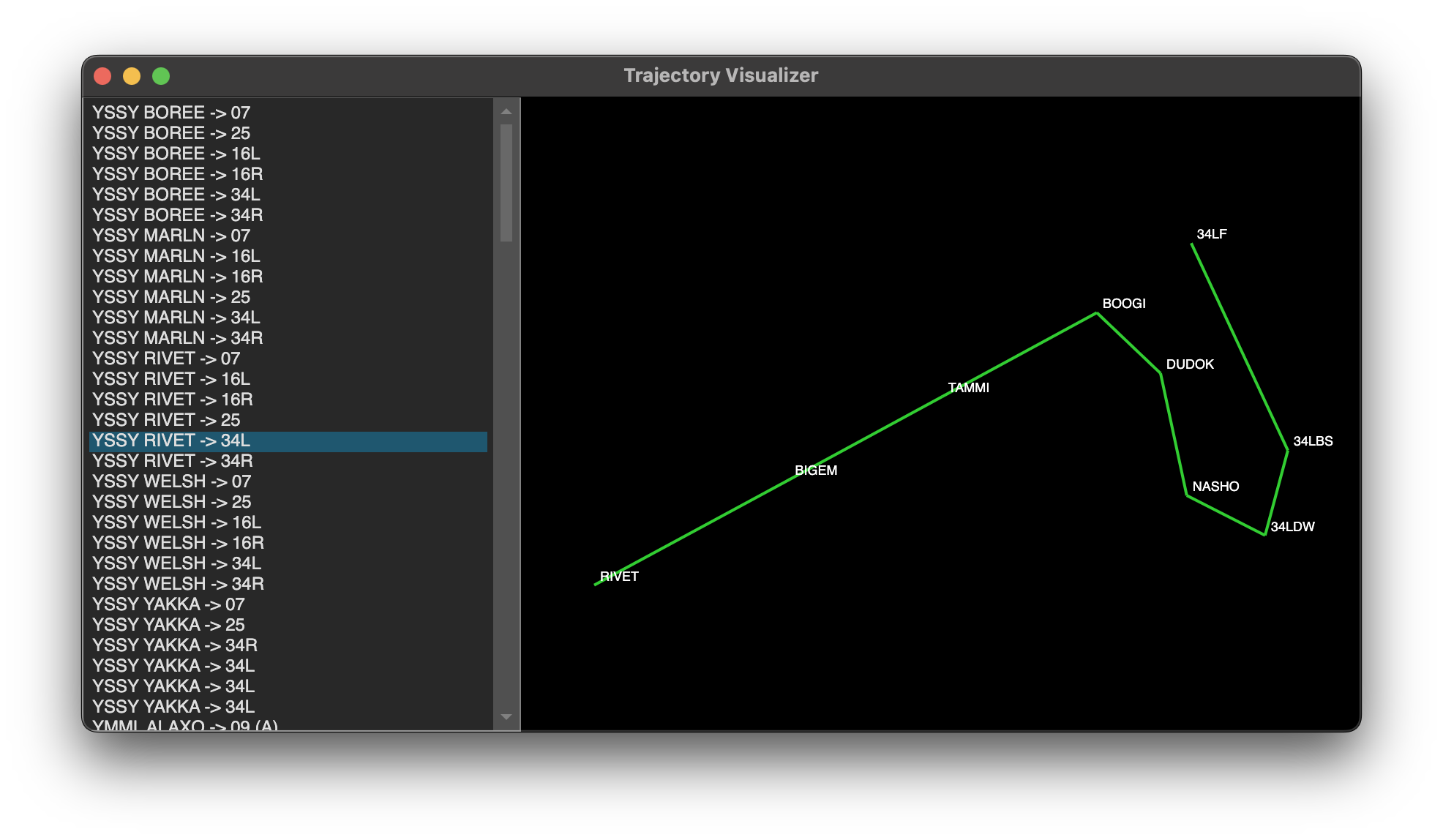
Opens a window displaying trajectory segments from a Maestro.yaml file. Intended for verifying trajectory geometry before deploying configuration.
maestro-tools visualize --config <path>
| Option | Required | Description |
|---|---|---|
--config | Yes | Path to the Maestro.yaml file to read trajectories from |
The left panel lists all terminal trajectories found in the file. Clicking a trajectory draws it on the canvas:
- Green - normal path from feeder fix to runway threshold
- Orange - pressure branch (diverges from the normal path after the configured
Aftersegment) - Red - max-pressure branch
Waypoint identifiers are labelled along the normal path. The view scales automatically to fit the selected trajectory.
Configuration File
The tool is configured via a YAML file (conventionally named maestro-tools.yaml). It supports multiple airports in a single run.
Airports:
  - ICAO: YSSY
    FeederFixes: [RIVET, WELSH, BOREE, YAKKA, MARLN]
    Output: trajectories/yssy.yaml
    PressureConfiguration:

      # Single entry for multiple feeder fixes sharing the same pressure pattern
      - FeederFixes: [RIVET, WELSH, BOREE]
        RunwayIdentifier: 34L

        # Pressure trajectory: 3nm extended downwind after NASHO
        Pressure:
          After: NASHO
          Segments:
            - {Identifier: DOWNWIND_EXT, Track: 155, DistanceNM: 3.0}
            - {Identifier: BASE, Track: 065, DistanceNM: 4.0}
            - {Identifier: FINAL, Track: 335, DistanceNM: 15.0}

        # Max pressure trajectory: 5nm extended downwind after NASHO
        MaxPressure:
          After: NASHO
          Segments:
            - {Identifier: DOWNWIND_EXT, Track: 155, DistanceNM: 5.0}
            - {Identifier: BASE, Track: 065, DistanceNM: 4.0}
            - {Identifier: FINAL, Track: 335, DistanceNM: 17.0}
Airport Properties
| Property | Type | Required | Description |
|---|---|---|---|
ICAO | string | Yes | Airport ICAO code |
FeederFixes | array | No | Only emit trajectories for these feeder fixes. If empty, all feeder fixes found in the STARs are included. |
Output | string | Yes | Output file path for the generated YAML |
PressureConfiguration | array | No | Branching pressure trajectory configurations (see below) |
Pressure Configuration
PressureConfiguration entries define branching pressure trajectories. Each entry matches one or more base trajectories and attaches alternative paths for delay absorption.
Matching Fields:
| Field | Type | Required | Description |
|---|---|---|---|
FeederFixes | array | Yes | Matches trajectories with feeder fix in this array (supports multiple) |
RunwayIdentifier | string | Yes | Must match the trajectory runway |
TransitionFix | string | No | If set, only matches trajectories with this transition fix |
ApproachType | string | No | If set, only matches trajectories with this approach type |
Branching Trajectory Fields:
| Field | Type | Required | Description |
|---|---|---|---|
Pressure.After | string | Yes* | Last shared segment identifier - pressure trajectory diverges after this waypoint |
Pressure.Segments | array | Yes* | Complete path from after the specified segment to runway |
MaxPressure.After | string | Yes* | Last shared segment identifier - max-pressure trajectory diverges after this waypoint |
MaxPressure.Segments | array | Yes* | Complete path from after the specified segment to runway |
*Required if Pressure or MaxPressure is specified.
Branching Model:
- Base trajectory defines the direct route from feeder fix to runway
- Pressure trajectory diverges after the
Aftersegment, flies alternative path to absorb moderate delay - Max pressure trajectory diverges after its
Aftersegment (same or different point), flies extended path for maximum delay absorption - Computation: TTG from feeder fix through
Aftersegment + alternative path ETI
Workflow
A typical workflow for preparing trajectory data:
- Obtain the vatSys
Airspace.xmlfor the relevant dataset. - Create a
maestro-tools.yamlwith the airports and feeder fixes. - (Optional) Define
PressureConfigurationentries for routes requiring pressure trajectories:- Identify where alternative paths diverge from base trajectories (the
Aftersegment) - Specify complete alternative paths from after that segment to runway
- Use multi-fix support (
FeederFixesarray) to avoid duplication
- Identify where alternative paths diverge from base trajectories (the
- Run
extract-starsto generate the trajectory YAML files. - Review and edit the output files:
- Modify segments where operational routing differs from published STARs
- Remove unnecessary segments (e.g., where vectoring begins early)
- Add custom segments for vectoring areas not in vatSys
- Verify
Aftersegment identifiers exist in base trajectories
- Copy the edited trajectories into the
Trajectoriessection ofMaestro.yaml.
When STARs are updated in the vatSys dataset, re-running extract-stars regenerates the segment geometry automatically. Pressure configurations defined in maestro-tools.yaml are preserved across regenerations, but manual trajectory edits in output files will be overwritten.