System Overview
What is MAESTRO?
MAESTRO is a traffic flow management system that provides sequencing information to controllers to optimise the flow of arrivals into an airport. It sequences inbound arrivals, delaying them when required to achieve a desired landing rate.
MAESTRO is a sequencing aid only. It does not provide separation advice. Controllers remain responsible for ensuring separation is maintained.
Common Abbreviations
| Term | Meaning |
|---|---|
ETA_FF | Estimated time at the feeder fix (from vatSys) |
ETA | Estimated landing time (calculated by vMaestro) |
STA_FF | Scheduled time at the feeder fix (calculated by vMaestro) |
STA | Scheduled landing time (calculated by vMaestro) |
TTG | Time-to-Go from feeder fix to runway threshold |
Managed Airport
The managed airport is the airport vMaestro is sequencing arrivals for. All flights in the sequence are arriving at this airport.
Departure Airports
Departure airports are airports within close proximity to the managed airport, typically within 30–45 minutes flight time. Flights originating from these airports appear in the Pending List when activated.
Feeder Fixes
A feeder fix is a point along the TMA boundary where flights are transferred from Enroute to the TMA. Feeder fixes generally correspond to a particular STAR, though they may not be the STAR entry point.
vMaestro uses the feeder fix to:
- Determine which runway to assign based on runway mode preferences
- Calculate the landing estimate using predefined trajectories
- Position flights on feeder views
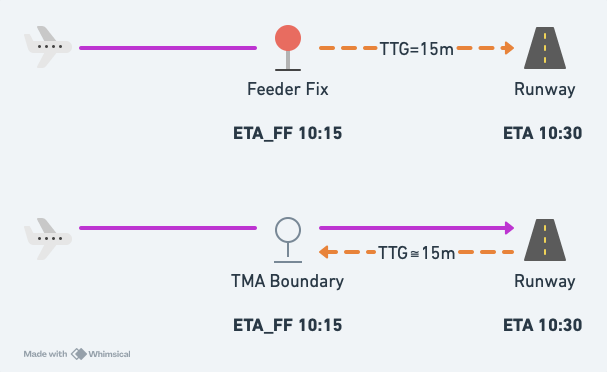
A flight may have an ETA_FF without tracking via a specific feeder fix. In this case, the time represents the expected transfer time to the TMA.
Terminal Trajectories
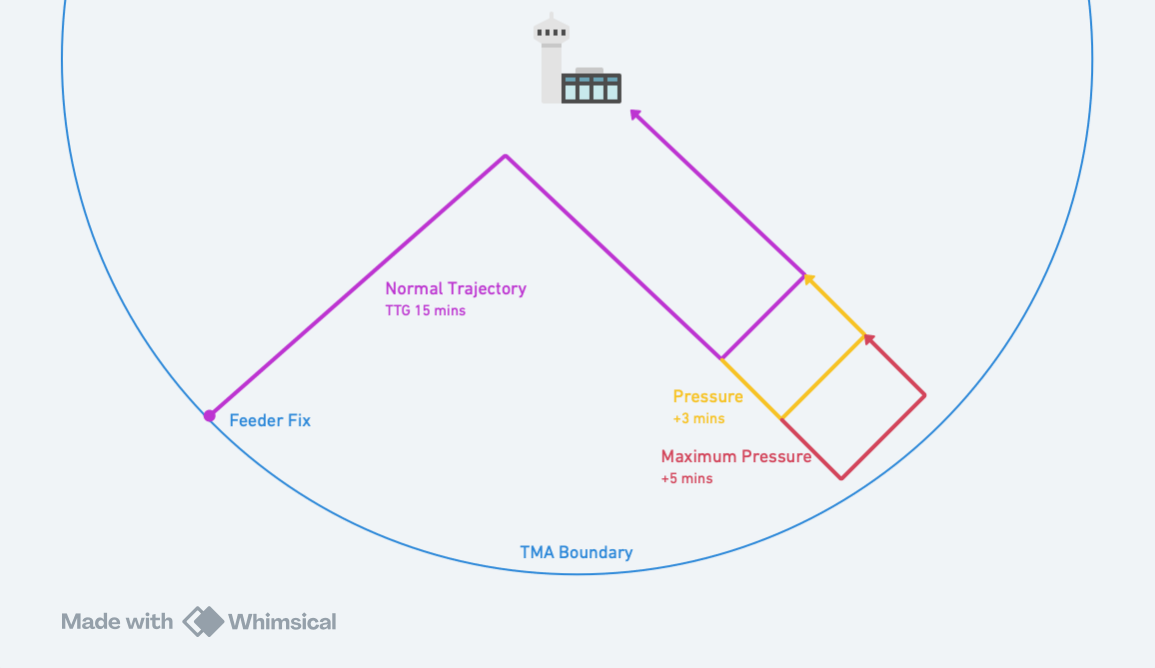
Terminal trajectories define the paths a flight takes from its feeder fix to the runway threshold. vMaestro uses them to estimate arrival times and determine how much delay can be absorbed in each phase of flight.
vMaestro models three terminal trajectories:
- Normal Approach: Used to calculate the travel time from the feeder fix to the runway threshold, or time-to-go (TTG)
- Pressure Approach: A small path extension for absorbing minor delays
- Maximum Pressure Approach: The largest path extension that can be used for absorbing delay within the TMA
Runway Modes
A runway mode defines which runways are active for arrivals. Each runway mode specifies:
- Which runways are in use
- Landing rates for each runway
- Feeder fix preferences for runway assignment
vMaestro uses the active runway mode to determine how flights are assigned to runways and scheduled. See TMA Configuration for how to change runway modes during operation.
Slots
Slots reserve runway capacity by preventing flights from being scheduled during a specific time period. They are used for special operations, configuration changes, or other reasons requiring a gap in arrivals.
See Slots for how to manage slots during operation.
Flight Creation
When a flight plan is created in vatSys, the flight becomes visible to vMaestro. At this stage, the flight is not yet active and is not being processed.
Flight Activation
A flight is activated in vMaestro when it is added to the sequence. This can happen automatically or manually.
Flights are automatically activated when their flight plan is active in vatSys and their estimated flight time and time-to-landing fall within the configured thresholds.
Flights from departure airports are activated automatically once they are airborne, or can be manually activated early from the Pending List.
Pending List
The pending list contains all flights that have not yet been activated. A flight remains pending until it either meets the criteria for automatic activation, or is manually activated by a controller.
Pending flights can be manually activated early, allowing any required delay to be absorbed on the ground rather than in the air.
Flights not tracking via a feeder fix cannot be automatically activated and must be manually activated.
The Processing Cycle
vMaestro processes all active flights every 30 seconds. Each cycle performs the following steps for each flight.
1. Estimate Calculation
The ETA_FF is sourced from vatSys route estimates.
The landing estimate (ETA) is then calculated by adding the time-to-go (TTG) from the allocated trajectory.
If a PETO has been set along the route, vatSys will re-calculate the route estimates based on the PETO, rather than the natural ETO.
This will affect the ETA_FF used by vMaestro.
For flights not tracking via a feeder fix, an average TTG will be calculated, and the ETA_FF is derived by subtracting the average TTG from the last estimate in the flight plan route.
Once a flight passes the feeder fix, its ETA stops updating. Delay figures on the label will not change after that point, regardless of the flight's state.
Current vs Initial Estimates
vMaestro tracks two sets of estimates for each flight:
- Current estimates (
ETA_FF,ETA) — Updated each processing cycle based on the latest data - Initial estimates (
Initial ETA_FF,Initial ETA) — The estimates at the time the flight became Stable
While Unstable, both sets match. Once Stable, the initial estimates are locked and used as the baseline for delay calculations. Recomputing a flight resets the initial estimates to the current values.
Hold Exit Times
When using vMaestro in conjunction with the Hold Plugin, the ETA_FF will be calculated based on the hold exit time, rather than the natural ETO.
2. Sequencing
Flights are ordered by their ETA following a first-come, first-served approach.
Unstable flights may change position as their ETA changes.
Stablised flights will generally not change their position in the sequence unless manual intervention is performed.
3. Scheduling
During scheduling, vMaestro assigns each flight a runway and calculates its scheduled landing time (STA). The runway's acceptance rate enforces minimum separation, and conflicts are resolved by delaying flights as necessary.
Runways are assigned based on the active runway mode. If the runway mode specifies preferred feeder fixes, flights via those fixes are assigned to the corresponding runway. Otherwise, vMaestro calculates the STA for each available runway and assigns the one resulting in the earliest landing time. Flights not tracking via a feeder fix are assigned to the first runway in the runway mode.
The STA is assigned based on the flight's sequence position and is never earlier than the ETA unless manually adjusted. The STA_FF is derived from the ETA_FF plus the enroute portion of the required delay (the delay the aircraft must absorb before crossing the feeder fix). It is not derived from the STA and TTG.
Flights allocated a maximum delay are prioritised. If their calculated delay exceeds the maximum, they are moved forward by swapping with preceding flights until their total delay is within the allocated maximum.
Flights will not be scheduled to land during a Slot, or during a Runway Mode transition period.
Multiple flights tracking via the same feeder fix may share the same STA_FF if they have different trajectory times (e.g., different aircraft categories). Labels may overlap on feeder fix views but will separate on runway views.
4. Delay Calculation
The required delay is the difference between the scheduled landing time and the initial estimate. This delay is split into two portions:
- Enroute delay: absorbed before the feeder fix through speed reduction, vectoring, or holding
- Terminal delay: absorbed within the TMA through speed reduction and vectoring
The terminal trajectory's Pmax determines how much delay can be assigned as terminal delay. Any remainder is assigned to enroute. If no pressure trajectory is configured, all delay is enroute.
The remaining delay for each portion decreases as the flight absorbs it. A controller action is calculated based on the total required and remaining delay:
| Controller Action | Meaning |
|---|---|
| Expedite | Delay is negative, and aircraft needs to speed up to meet the required time |
| No Delay | No delay is required |
| Resume | Very small delay remaining, and aircraft will absorb it by resuming track (e.g., completing a turn out of holding) |
| Speed Reduction | Small delay that can be absorbed through speed reduction |
| Path Stretching | Medium delay that requires additional track miles (e.g., vectoring) |
| Holding | Large delay requiring the aircraft to enter a holding pattern |
5. State Transition
The flight's state is updated based on time to ETA_FF and STA. As flights progress through states, processing becomes increasingly restricted. See Flight States below.
Flight States
vMaestro uses states to control how flights are processed. Flights progress through these states as they approach landing.
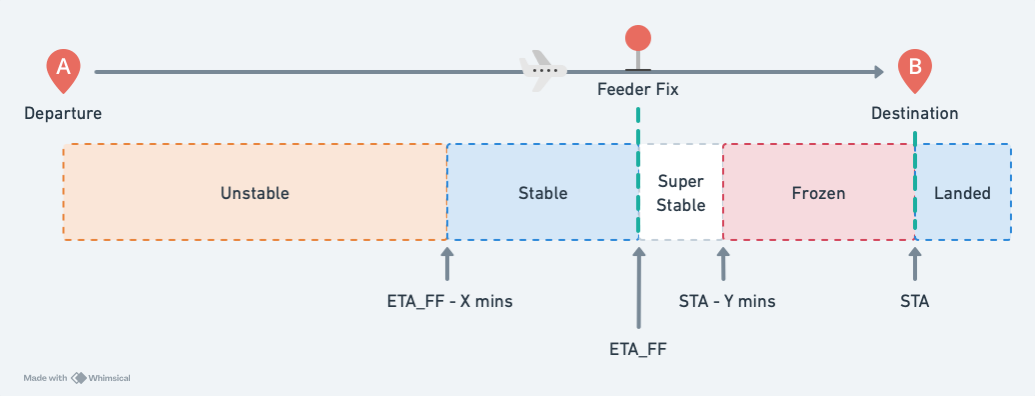
Estimates are less accurate when flights are far away. As flights get closer, their estimates stabilise, and the need for the sequence to remain stable becomes more important. Flight states balance this by allowing more flexibility early on and progressively locking the sequence as flights approach.
Unstable
All new flights start in this state. On each update, the full processing cycle runs: estimates are recalculated, the flight is repositioned in the sequence, and scheduling assigns a runway and STA. The runway and approach type may change if an earlier STA is available on an alternative runway.
Stable
Flights become Stable as they approach the ETA_FF. From this point, only estimates (ETA_FF, ETA) and remaining delay are recalculated on each update. Sequencing and scheduling no longer run automatically.
Stable flights keep their position unless displaced by controller action on a preceding flight, or a new flight entering with an earlier ETA.
There is no alert when required delays change. Controllers should regularly review delay figures to recognise changes.
SuperStable
Flights become SuperStable at their original ETA_FF (i.e. the ETA_FF at the time they became stable). Processing is the same as Stable, but the flight is fixed in position. All new flights are positioned after it. Displacement only occurs through controller action on this flight or a preceding flight.
Frozen
Flights become Frozen as they approach the STA. Processing is the same as Stable, but the flight cannot be displaced at all, even by controller actions.
Landed
Flights become Landed at the STA. Processing stops entirely. The last 5 landed flights remain visible in case of an overshoot, after which they are removed. Flights are also removed when deleted from vatSys.
Online Mode
vMaestro supports multi-user operation through an optional server component. This allows multiple controllers to collaborate on a single sequence in real-time.
Master and Slave Connections
When multiple controllers are connected, one client acts as the Master and the rest act as Slaves.
The Master client:
- Receives and processes all flight data from vatSys
- Runs the sequence processing cycle
- Broadcasts the resulting sequence state to all connected clients
Slave clients:
- Receive the sequence state from the Master
- Can make changes to the sequence, subject to permissions enforced by the Master
- Relay those changes to the Master for processing
Master Selection
The Master is selected based on the controller's role. Roles with greater visibility range take higher priority, since a controller who can see more traffic produces a more accurate sequence.
| Priority | Role |
|---|---|
| 3 | Flow (FMP) |
| 2 | Enroute (ENR) |
| 1 | Approach (APP) |
When a controller with a higher-priority role connects, they automatically become the Master. The previous Master becomes a Slave.
Observer connections are never eligible for Master.
Roles
Flow (FMP)
The Flow role is intended for the Flow Management Position. A Flow controller is always the Master when connected. When a Flow controller connects:
- They become the Master immediately, regardless of who was Master before
- Their client receives all flight data from vatSys and runs the sequence processing cycle
- The resulting sequence state is broadcast to all other connected clients
Enroute (ENR)
The Enroute role is intended for Enroute controllers managing traffic prior to the TMA boundary. An Enroute controller acts as Master when no Flow controller is connected. If an Approach controller was the Master when the Enroute controller connects, the Enroute controller takes over as Master.
When a Flow controller is online, some functions may be restricted depending on configuration.
Approach (APP)
The Approach role is intended for Approach controllers working traffic within the TMA. An Approach controller acts as Master only when no Flow or Enroute controller is connected.
When a Flow controller is online, some functions may be restricted depending on configuration.
Observer (OBS)
The Observer role provides read-only access to the sequence. Observers cannot make any modifications and are never eligible to be the Master.
Pseudo-Flow Mode
When no Flow controller is online, all connected Enroute and Approach controllers can modify the sequence without restriction. Permissions are only enforced when a Flow controller is online.
The connection status shows ENR/FLOW or APP/FLOW to indicate no Flow controller is online. The highest-priority connected controller acts as Master:
- If only Approach controllers are connected, one acts as Master
- If an Enroute controller connects, they take over as Master
Sequence changes are still synchronised across all clients.
Environments
Environments allow multiple independent sequences for the same airport to run simultaneously on a single server. Common uses include:
- Separating live VATSIM operations from training sessions
- Running multiple training scenarios concurrently
Each environment maintains its own sequence state and does not affect other environments.
Permissions
Administrators can configure which roles are permitted to perform specific actions. See the Admin Guide for permission configuration details.